How to Screenshot Pages That Require Authentication
If you need to capture a screenshot of a URL that requires authentication, there are a few options available to you when using our screenshot API:
- Pass session cookies with your screenshot request
- Pass an Authorization header with your screenshot request
Cookies
If you need to capture a screenshot of a web page behind a login, pass your session cookie in the screenshot request.
Imagine you want to capture a screenshot of the dashboard page in your Screenshot Scout account. Here is what you need to do.
-
Get your session cookie
First, log in to your account in the browser using your email and password.
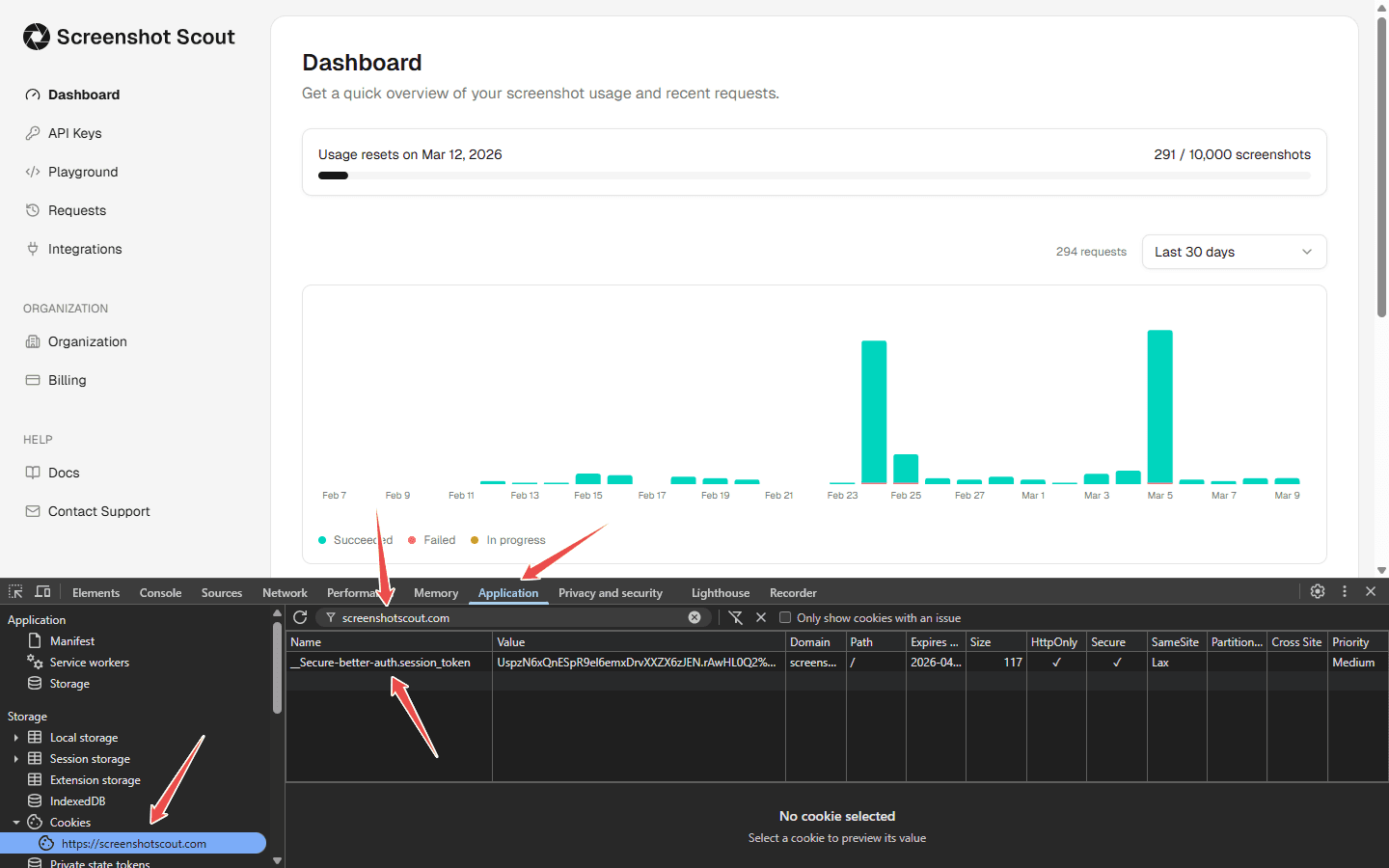
After you have logged in, if you are using Chrome, press F12 and go to the Application tab. In the left side panel, under Storage > Cookies, find
https://screenshotscout.com. Then find only the cookies created by screenshotscout.com.In the case of Screenshot Scout, the cookie name you are looking for is
__Secure-better-auth.session_token. Depending on the site, this can be different.Copy all the cookie parameters you see in your browser. In the case of Screenshot Scout, you will copy Name, Value, Domain, Path, HttpOnly, Secure, and SameSite.
-
Pass the cookie to the request URL
Format the cookie parameters you collected using this Set-Cookie-like format:
__Secure-better-auth.session_token=CQhDDUmP4XFMCArVPuOWfc6du7rfzx83.5QEpu7%2FRgICZB%2Bl%2BADU0Zd64v5wC%2BDqypNIAqEUwWTI%3D; Domain=screenshotscout.com; Path=/; HttpOnly; Secure; SameSite=LaxOnce formatted, pass the formatted string to the screenshot request URL via the
cookiesscreenshot option.Request URL example (unencoded for readability):
https://api.screenshotscout.com/v1/capture?access_key=YOUR_ACCESS_KEY&url=https://screenshotscout.com/app/dashboard&cookies=__Secure-better-auth.session_token=CQhDDUmP4XFMCArVPuOWfc6du7rfzx83.5QEpu7%2FRgICZB%2Bl%2BADU0Zd64v5wC%2BDqypNIAqEUwWTI%3D; Domain=screenshotscout.com; Path=/; HttpOnly; Secure; SameSite=LaxIf you have collected all the necessary cookie parameters and formatted them properly, your screenshot will now show the correct destination page behind the login, not the login page itself.
Authorization header
If the URL you need to capture a screenshot of supports the Authorization header, you can pass it using the headers screenshot option.
Request URL example (unencoded for readability):
https://api.screenshotscout.com/v1/capture?access_key=YOUR_ACCESS_KEY&url=https://example.com/&headers=Authorization: Bearer YOUR_BEARER_TOKEN